Keep track of important dates and deadlines by placing a reminder banner that will stay at the top or bottom of the screen. The interface of the utility supports several categories such as birthdays or anniversaries and shows the days remaining. Startup and Quick Launch integration is possible.
Holiline Reminder is both an event reminder and a calendar.
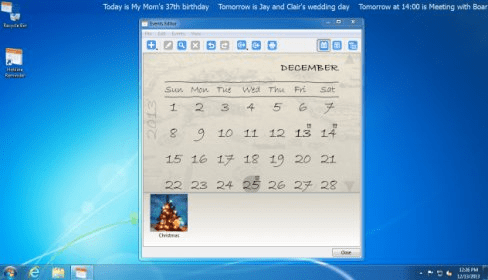
You shouldn’t have any difficulties with understanding and using the program. It doesn’t have the main interface; instead, it provides a line of scrolling text over the taskbar. But if you right click on this line, you can adjust the actual settings of the application.
The program allows you to fill in information related to different types of events. The classic appearance of the written message announcing an event can be supplemented with a photo or a comment. Moreover, the message can be set to appear with a certain number of days before the event's occurrence (this feature might be useful if you want to buy a gift for instance). What's more, you can add information about birthdays, planned holidays or any other occasions that need to be remembered. In addition, the app lets you both export and import the information. And if you want to find something within the database, the search function is of great help.
The notifications can be placed over the taskbar, at the top or at the bottom of the desktop. You can also select the font, the color, or the speed of running messages in the scrolling line. more






Comments (1)
We try to react on every request or concerns from our users.
So it was very important for us to know what can stop you from using Holiline.
Now from 2.1.0 you can place the program panel below other windows, so it just sticks to the desktop. I hope it will be more convenient for our users who leave the program running all the time.
Thank you!
Eugene ([email protected])